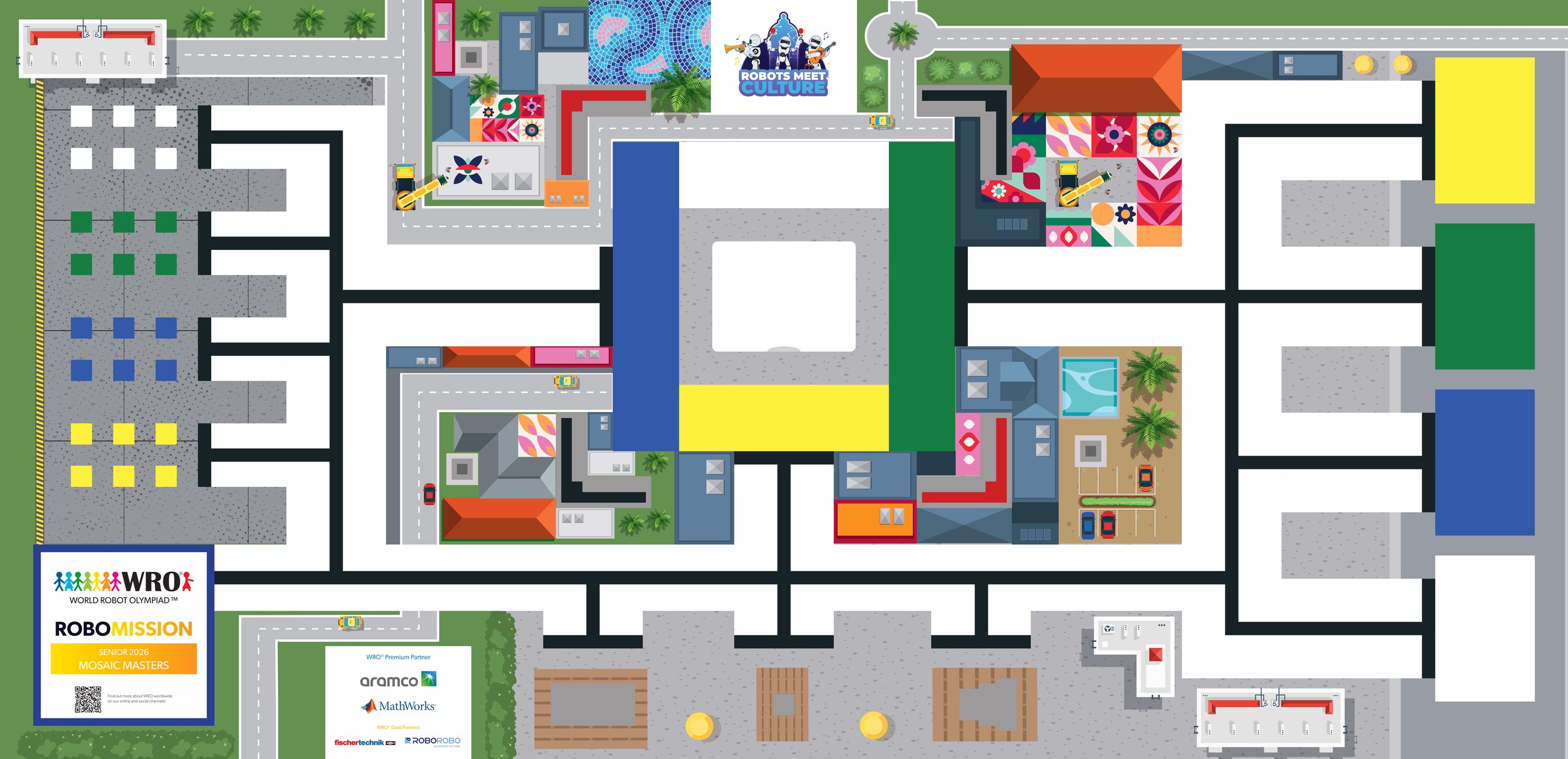
The WRO RoboMission Senior 2026 "Mosaic Masters" mat measures 2362 mm × 1143 mm (same overall field size as the other age categories, ± 5 mm tolerance per dimension). Your robot restores a damaged mosaic: collect coloured tiles, place them in the 3D-printed mosaic frame in the middle of the field, and deliver cement elements to their matching colour targets — while parking tools in the sponsor area, parking space and start area. The overlay adds a 50 mm reference grid, edge ruler, and labelled call-outs for every zone that scores points. Use the toolbar to measure distances, plan robot paths, check turn angles, and place a robot footprint. Click EXPORT CODE to convert a planned path into starter Python or Word Blocks pseudocode. Coordinates use a top-left origin (0, 0).
Route planner → PyBricks
Walk the route on the mat
Scoring estimator
Key zones (mm, top-left origin)
| Zone | X | Y | X2 | Y2 | W | H |
|---|
Mat dimensions
- Width
- 2362 mm (≈ 92.99 in)
- Height
- 1143 mm (≈ 45.00 in)
- Aspect
- 2.066 : 1
- Tolerance
- ± 5 mm per dimension
- Border height
- 50 mm (table wall)
Reference grid
- Minor
- 50 mm (faint white)
- Major
- 200 mm (brighter white)
- Edge ticks
- 100 mm, labelled every 500 mm
- Origin (0,0)
- top-left corner of mat
- Centre
- (1181, 571.5) mm
Zone legend
- Start area (masonry trowel target)
- Tool targets · sponsor area & parking space
- Mosaic tile storage (4 colours)
- Mosaic frame · marking & 3D-object mount
- Cement target areas (4 colours)
- Barriers · avoid touching (4 corners)